Forget work, huge recording studios, expensive gear, towering effects racks, and sequencing learning curves. Let’s talk about how to use these MIDI Drum Files just for fun.
Out of the 10,000 or so people that have accessed our drum files recently, a large percentage of them use the files to back up original music tracks. Another block of people download them specifically as cell phone ringtones (more about how to do that in a later email). But hidden in there somewhere is a group of people that come up with creative uses for these files just for fun. I thought you might like to hear some of the stories and get some creative ideas for yourself.
Take Mary (San Francisco, Ca), for example. After getting our complete set of MIDI Drum Files, she selected about 35 and proceeded to chain them all together using Cakewalk’s Sonar 3. She added some strings over the top of the beats and converted them into one long MP3. Now they can be heard almost every day in the lobby of her ‘modern dance’ studio in Southern San Francisco. Thanks Mary.
Then there’s Toby (Springfield Mo.)… Junior High camp director. He bought these files for a 2003 summer camp he was involved with in Missouri. Selecting out the Rap and Rave, beats he gave the students one week to come up with the best rap about their counselors. The kids were able to pick the beat they wanted and could perform it in front of everybody. The show was a screaming success and the performers had their friends rolling on the floor with laughter. Thanks Toby.
OK, its Halloween night, the lights are dark, the spider webs are hung above the entry way. Who better to greet unsuspecting trick-or-treeters than Snoop Doggy Dog Himself…. Or at least Mark H. of Houston TX. made up to look like ‘The Dog’. The drum files play all around his house to make it sound like one of his rap song drum beats. He greets the kids who stop by. Most of them ask if he really is Snoop. Thanks for the creativity Mark.
These are some stories that have come from creative people over the years who not only get good use out of our MIDI Drum Files, but also have fun with them in the process. If you have any stories like these of creative ways to use our drum files… Please let us know about it.
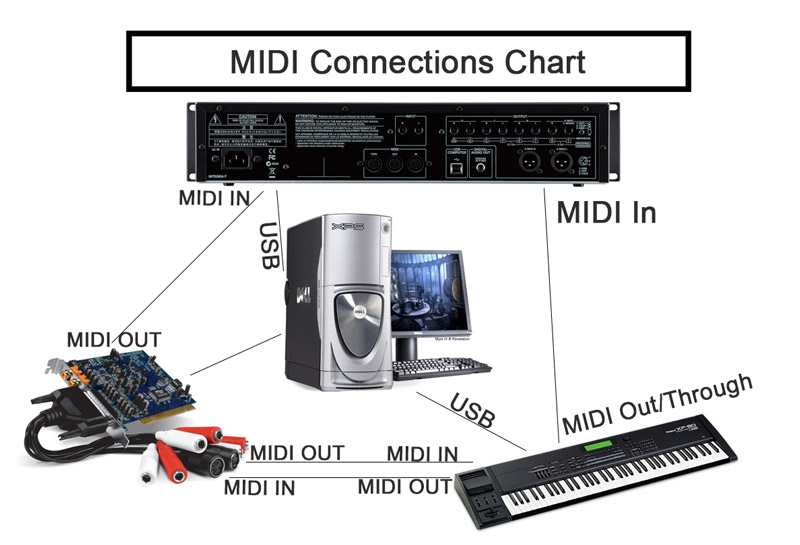
MIDI In/Out through a sound card or direct via USB connection
M.I.D.I. – Musical Instrument Digital Interface
Basically, MIDI is a computer language used in networking two or more devices together. The specific devices we are most often referring to when discussing MIDI are musical computers, like synthesizers or signal processors. Essentially this means that you can hook up two musical devices and have them “communicate” with each other.
Some Basic Concepts
You don’t need to understand nuclear fusion to get a grasp on this MIDI stuff, there are just a few basic concepts you have to grasp.
MIDI information IS NOT audio information. This is a hang up for many people who are just starting out in the music and audio arena. MIDI is merely a set of numerical instructions that are sent and received between the devices. The musical devices then translate this data into meaningful commands. So when a MIDI command is sent from one device to another, the signal is telling the second device which notes to play, how long to hold them, which sounds to use… etc.
You need to understand how the flow of MIDI information works. MIDI data is sent out of the “OUT” port, MIDI data is received at the “IN” port. So for example if you want to send a MIDI data from a sequencer to a synthesizer the cables would connect on the OUT of the sequencer (because info is coming out) to the IN of the synthesizer (because the synth is receiving info). This can be confusing at first because the temptation is to plug the IN of one machine directly into the IN of another. But if you do that, you are not going to get any sound…. Ever.
Channels – MIDI data transmits on 16 different channels. This allows for 16 different sets of MIDI data to be sent at once, which means a sequencer could control up to 16 different instruments at one time. Typically each instrument would be sent separately on a different channel. For example, drum track information is usually sent on channel 10 and so would play back on channel 10, Bass guitar sounds are usually on channel 2, synth on 4 and so on. You just have to make sure that the synthesizer that is receiving the channels has the correct sound selected for that channel.
Because MIDI does not carry with it the actual audio sound data, but just the note commands, midi files are extremely light and compact. A large number of songs can take up a relatively small amount of space on a disk or hard drive. This reason, along with it’s versatility makes MIDI an ideal language for almost any musician, and especially those who are on the road for performances or deal in large volumes of music.